Full Year Planner Template for Structured Annual Planning
If you have ever tried to build a yearly planner from scratch, you already know how quickly the process can stall. Between deciding on layouts, formatting monthly spreads, ensuring print readiness, and maintaining consistent design across twelve months, the work multiplies fast. That is where a Full Year Planner Template changes the game. Instead of starting with a blank canvas, you begin with a complete, ready-to-adapt structure that already includes monthly sections, notes pages, and dedicated spots for important dates. Whether you publish on Amazon KDP, run a print-on-demand shop, or sell productivity journals, this template removes the repetitive groundwork and lets you focus on branding, customization, and getting your product to market faster.
What the Full Year Planner Template Actually Includes
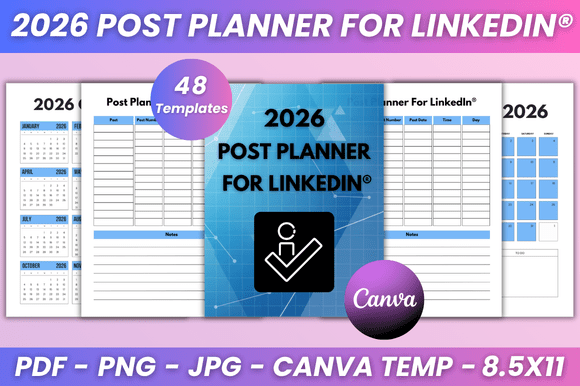
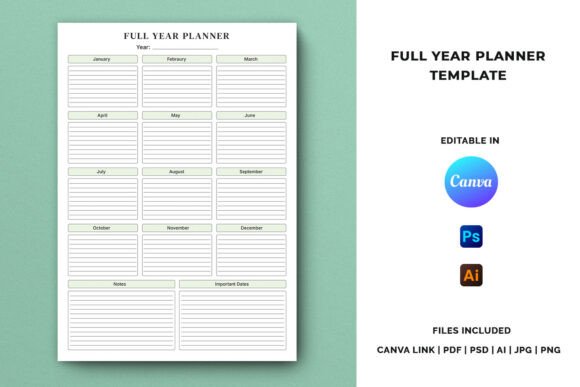
This template is more than a simple calendar grid. It is a complete yearly layout engineered for both functionality and easy editing. Each month has its own section, complemented by notes pages that give users breathing room for reflections, goal tracking, or brainstorming. The important dates tracking feature ensures buyers have a dedicated place to mark birthdays, deadlines, appointments, and recurring events. For creators, this means you are not guessing what your audience needs. The structure already reflects what most planner users expect: clear monthly overviews, space for notes, and a centralized place to track key dates.
The file package covers multiple formats. You receive a Canva template link, along with PDF, AI, PSD, JPG, and PNG files. All source files come compressed in one ZIP archive, and an included instruction PDF walks you through editing and customization step by step. If you have ever fumbled with mismatched layers or missing fonts, that guide saves serious time.
Why This Template Works for Different Creators
Not every planner creator works the same way. Some prefer drag-and-drop editing in Canva, while others need layered Photoshop or Illustrator files for precise control. This template accommodates both approaches. The specifications reinforce that flexibility: A4 size, print-ready CMYK color mode, high resolution at 300 DPI, and editable text throughout. For KDP publishers, these specs are exactly what Amazon’s printing requirements demand. For Etsy sellers or designers offering digital downloads, the high-resolution JPG and PNG files give buyers immediate use without additional software.
Entrepreneurs launching a planner brand for the first time often worry about technical details like bleed margins or color profiles. The included instruction PDF addresses those concerns directly. You follow the guide, modify text and branding to match your niche, and export a finished product that looks professional from the start.
Realistic Use Cases Across Different Audiences
- KDP low-content publishers can upload the print-ready PDF directly to Amazon, customize the cover and interior branding, and list a new yearly planner in hours rather than weeks.
- Print-on-demand shop owners on platforms like Etsy, Creative Market, or Gumroad benefit from the editable Canva link, which lets them create multiple variations for different niches — academic planners, wellness journals, business organizers — without redoing the layout each time.
- Productivity journal designers who sell planner inserts or printable bundles gain flexibility by offering the template in both digital fillable formats and print-ready versions for customers who prefer physical binding.
- Educators and bloggers who want to create branded yearly planners for their audience or students can modify colors, fonts, and section headings in Canva without learning graphic design software.
- Freelancers and business owners building their own annual planning system can use the template internally while also selling customized versions to clients or subscribers.
Key Characteristics That Stand Out
Several qualities make this template notably useful for commercial publishing. First, the editable text means you are not stuck with placeholder copy. You can rewrite every label, add your own categories, and adjust the language to match your audience — whether you are selling to busy parents, corporate professionals, or creative freelancers. Second, the 300 DPI resolution ensures clean print output without pixelation, which matters when customers hold your product in their hands and notice detail quality.
The CMYK color space is another detail that experienced publishers recognize immediately. RGB files look fine on screen but often print with dull or shifted colors. Starting in CMYK reduces surprises when you order proofs or ship files to a print partner. Combined with the included AI and PSD source files, you retain full control over colors, layers, and typography throughout production.
One less obvious strength is the instruction PDF. Many templates assume you already know how to edit them. This one walks you through the process, which cuts down the learning curve for newer creators and reduces mistakes that lead to returns, revisions, or negative reviews. For experienced designers, the guide still speeds up workflow by pointing to exactly where each editable element lives.
Practical Benefits for Efficiency and Branding
When you sell planners online, your customers are making a decision based on visuals, structure, and perceived value. Starting with a polished template gives you an edge in all three areas. The monthly sections provide a logical flow that feels familiar to anyone who has used a paper planner. The notes pages add perceived value because buyers see that you have included extra space beyond just dates. The important dates tracking consolidates what would otherwise be scattered across sticky notes or phone reminders into one dedicated spread.
From a branding perspective, you can modify colors, fonts, and layout elements in Canva or Illustrator to match a specific theme — minimalist, botanical, professional, academic, or even seasonal editions. For example, a creator targeting wedding planners might swap the color palette to soft pastels and rename the sections to reflect vendor checklists and appointment tracking. Another creator selling to project managers could keep the layout monochrome, adjust the notes pages to include priority matrices, and embed goal-tracking prompts.
The template also scales well across product lines. Once you customize the source files for one niche, you can duplicate the project and tweak it for another audience. That repeatability is what makes it a practical tool for growing a planner business rather than just a one-off product.
Observations on Usability and User Experience
From a usability standpoint, the A4 size is a safe choice. It is large enough to include meaningful content per spread without feeling cramped, yet standard enough to fit easily into binders, ring-bound covers, or coil binding. If your customers include professionals who carry planners to meetings, the size works without being cumbersome.
The inclusion of multiple file formats also matters for user experience at the point of sale. A customer who buys a digital planner from your shop may prefer a PNG for tablet annotation, a fillable PDF for desktop use, or a print-ready file to take to a local print shop. By offering all formats, you accommodate different workflows in one purchase. That reduces friction and support requests.
Another observation involves the learning curve. Because the template comes with editable Canva link and source files, you can start customizing immediately even if you are not a professional designer. Canva’s interface is intuitive enough that swapping text, changing colors, and uploading logo assets takes minutes. For those who want deeper control, the AI and PSD files are available when you need them. This layered accessibility makes the template suitable for both beginners scaling a first product and experienced publishers managing multiple SKUs.
Considerations When Using the Template for Publishing
- Review the instruction PDF before editing. Even experienced users benefit from understanding where layers are organized and which elements are grouped. Skipping this step often leads to accidental deletions or misaligned layouts.
- Test print one spread early in your customization. Whether you are using a home printer or sending files to a print partner, validating color accuracy and margin alignment early prevents wasted runs later.
- Customize beyond the text. The real value of an editable template is the ability to add your own section headers, motivational prompts, or niche-specific categories. Buyers notice when a planner feels curated rather than generic.
- Optimize your product listing descriptions. When you sell via KDP or Etsy, mention the formats included (Canva link, PDF, AI, PSD, etc.) because customers searching for editable planners actively look for these details.
- Plan for multiple editions. Since the source files are fully editable, you can repurpose the same template for yearly, academic, or fiscal year calendars. Each version requires only color and label adjustments, not a structural rebuild.
Final Recommendations for Getting the Most from This Template
Approach this template as a foundation, not a finish line. The monthly sections, notes pages, and important dates tracking give you a strong starting structure, but the best planner products reflect their creator’s understanding of the end user. If you are publishing for students, consider adding semester highlights or exam date prompts. If your audience is corporate professionals, emphasize goal-setting sections and quarterly review areas. If you target creative entrepreneurs, leave room for habit tracking, project timelines, and freeform journaling space.
The file package supports those customizations. Because the text is editable and the designs are layered, you can add, remove, or rearrange elements without breaking the underlying layout. And because the template is built to KDP specifications, you eliminate the most common issues that delay publication: color mode mismatches, resolution errors, and bleed miscalculations.
Whether you are publishing your first planner or expanding an existing product line, the Full Year Planner Template offers a reliable shortcut to a professional result. It frees you to focus on branding, audience fit, and marketing instead of wrestling with layout details that have already been solved. By starting with a complete structure and adapting it thoughtfully, you can deliver a polished product faster and with fewer technical hurdles along the way.