Standard Operating Procedure SOP Page: Building Clarity and Consistency in Every Workflow
In any organization, team, or solo operation, the difference between smooth execution and repeated confusion often comes down to one thing: clear documentation. A Standard Operating Procedure SOP page serves as the backbone of consistent work, offering a repeatable framework for tasks that must be performed correctly every time. Whether you are managing a remote team, onboarding new employees, or publishing printable planners for sale, having a structured SOP page transforms vague instructions into reliable, actionable guides.
Today, more professionals and creators are turning to editable SOP templates because they recognize that documenting processes is not just about compliance—it is about saving time, reducing errors, and building a foundation for growth. A well-designed SOP page takes the guesswork out of recurring tasks and empowers everyone to work with confidence, regardless of their experience level.
Why a Structured SOP Page Matters Now More Than Ever
Workflows have become increasingly distributed. Teams operate across time zones, freelancers manage multiple clients, and small business owners wear several hats simultaneously. In this environment, relying on memory or verbal instructions is no longer sustainable. A Standard Operating Procedure SOP page provides a single source of truth that everyone can access, follow, and refer back to when questions arise.
The shift toward remote and hybrid work has accelerated the need for documented processes. When you cannot tap a colleague on the shoulder to ask how a task is done, having a clear SOP page becomes essential. It reduces friction, minimizes miscommunication, and ensures that even when team members change, the knowledge stays intact. This is especially relevant for entrepreneurs who create and sell business planners or internal process manuals—their customers are often looking for tools that bring order to chaotic workflows.
Beyond operational efficiency, SOP documentation also supports quality control. By defining quality checkpoints and escalation procedures within the same page, teams can catch errors early and address exceptions without derailing the entire process. This level of detail is what separates a functional workflow from one that constantly needs troubleshooting.
The Evolution of Process Documentation: From Static PDFs to Editable Templates
Traditional SOP documentation was often locked into rigid formats—printed binders or static PDFs that were difficult to update. When a process changed, the entire document had to be recreated or manually edited, leading to outdated instructions and wasted effort. Today, the trend has shifted toward flexible, editable SOP templates that can be customized for specific needs without starting from scratch.
The modern Standard Operating Procedure SOP page is designed with adaptability in mind. Editable source files, such as those available in Canva, Adobe Illustrator, and Photoshop, allow users to modify text, adjust layouts, and rebrand documents to match their company’s visual identity. This evolution reflects a broader move in the productivity and planning space: tools should serve the user, not the other way around. Low-content publishers and printable planner sellers have been quick to adopt this approach, recognizing that customers value templates they can personalize quickly and print with confidence.
Another important shift is the inclusion of instructions and guidance within the template package. A well-designed SOP page is not just a blank form; it includes an instruction PDF that walks users through customization and formatting. This removes the intimidation factor for non-designers and ensures that the template is accessible to a wider audience, from business owners to educators to freelance creatives.
Key Components of an Effective SOP Template
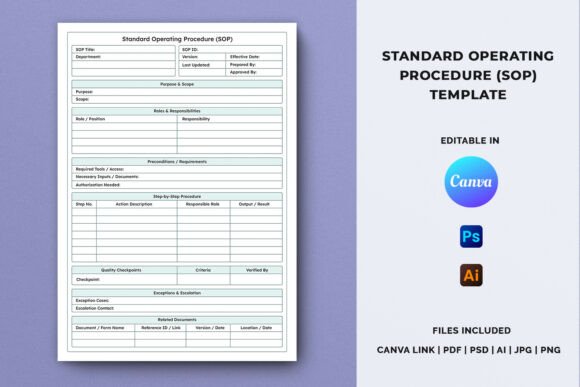
An effective Standard Operating Procedure SOP page is more than a list of steps. It provides a complete framework for understanding and executing a process. The most useful templates include dedicated sections that cover every aspect of the workflow:
Purpose and Scope
This section defines why the procedure exists and what it covers. It sets boundaries and clarifies the intended outcome. When team members understand the purpose, they are more likely to follow the procedure correctly and recognize when a situation falls outside the scope.
Roles and Responsibilities
Clarity about who does what prevents duplication of effort and ensures accountability. An SOP page that clearly lists roles helps teams avoid the common pitfall of assuming someone else will handle a critical step.
Preconditions
Before starting any procedure, certain conditions must be met. Documenting preconditions—such as required tools, completed training, or prior approvals—reduces the risk of beginning a process that cannot be completed successfully.
Step-by-Step Procedures
This is the heart of the SOP page. Each step should be written in clear, actionable language. Including sub-steps or notes for complex tasks makes the procedure easier to follow, especially for new team members or trainees.
Quality Checkpoints
Quality checkpoints are built-in verification points that ensure each phase of the process meets the required standard. They turn quality control from an afterthought into an integral part of the workflow.
Exceptions and Escalation
No procedure covers every possible scenario. A dedicated section for exceptions and escalation helps users know what to do when something unexpected occurs. This reduces downtime and prevents small issues from becoming major problems.
Related Documents
Linking to other procedures, forms, or reference materials creates a connected system of documentation. Users can find additional context without searching across multiple files or systems.
Templates that include all these sections, like the structured SOP planner page described by creators and sellers, offer a complete solution for documenting workflows with clarity and consistency.
Practical Applications Across Different Audiences
The versatility of a Standard Operating Procedure SOP page makes it valuable for a wide range of users. Each group benefits from the template in slightly different ways, but the core need remains the same: reducing complexity and increasing reliability.
Business owners and entrepreneurs use SOP pages to document recurring tasks such as client onboarding, order fulfillment, or content publishing. By standardizing these processes, they free up mental energy to focus on strategic growth. For a small business owner, an SOP template can be the difference between a chaotic workday and a predictable one.
Team leaders and managers find SOP documentation essential for training new hires. Instead of explaining the same process repeatedly, they can hand new team members a well-structured SOP page that covers all the key steps, responsibilities, and quality checks. This reduces training time and ensures consistency across the team.
Low-content publishers and printable planner sellers use SOP templates as product offerings for their customers. A thoughtfully designed SOP page fits naturally into business planners, internal process manuals, and training documentation. Sellers who offer editable templates—especially those optimized for KDP interiors and available in multiple file formats—meet a growing demand for professional, customizable planning tools. The inclusion of an instruction PDF and print-ready CMYK files adds significant value for buyers who want a polished final product.
Freelance designers and creative professionals benefit from having a standardized way to document their own workflows, such as project intake, client revisions, or file delivery. Using an SOP template helps them maintain quality across multiple projects and communicate clearly with clients about what to expect.
Why Customizability Is a Core Feature of Modern SOP Design
One of the most important trends in documentation is the move toward user-driven customization. A Standard Operating Procedure SOP page that arrives as a static PDF is far less useful than one that can be edited, rebranded, and reformatted to fit a specific context. This is why template packages that include source files for Canva, Adobe Illustrator, Photoshop, and other tools are increasingly popular.
Editable text means users can adjust language to match their industry, team culture, or personal style without having to work around locked elements. High-resolution, print-ready files ensure that the final document looks professional, whether it is printed for a binder or shared digitally. For KDP publishers, optimized interiors mean that templates integrate seamlessly into book formats without unexpected layout issues.
The inclusion of multiple file types—PDF, AI, PSD, JPG, PNG—gives users flexibility in how they work. Some prefer the simplicity of Canva for quick edits, while others need the precision of Illustrator for complex layouts. Providing both options respects the different skill levels and preferences within the target audience. The instruction PDF that comes with the package plays a crucial role here: it guides users through the editing process step by step, making customization accessible even to those who are not design experts.
Realistic Recommendations for Getting the Most from an SOP Template
Using a structured SOP page effectively requires more than just filling in the blanks. Here are some grounded recommendations based on practical experience:
Start with one procedure. If you are new to SOP documentation, choose a single, frequently repeated task to document first. This lets you test the template, refine your approach, and see the benefits without feeling overwhelmed.
Involve the people who do the work. The best SOP pages are created collaboratively. Ask the team members who execute the procedure to review the steps and suggest improvements. Their firsthand knowledge will make the documentation more accurate and useful.
Keep language simple and direct. Avoid jargon or overly formal phrasing. The goal is clarity, not impressiveness. A step that can be understood quickly is more likely to be followed correctly.
Update the SOP page regularly. Procedures evolve, and documentation should keep pace. Set a reminder to review each SOP page every few months, especially after changes in tools, team structure, or regulations.
Use the provided files as intended. When working with a template package, take the time to extract the ZIP file and read the instruction PDF before editing. This ensures you understand the file structure, formatting conventions, and customization options. Rushing past the instructions can lead to avoidable mistakes and wasted effort.
A well-crafted Standard Operating Procedure SOP page is a small investment that pays dividends in consistency, efficiency, and peace of mind. Whether you are documenting a simple daily task or a complex multi-step workflow, having a clear, structured template makes the process easier to create, maintain, and follow. For publishers, planners sellers, business owners, and creative professionals alike, the right SOP template turns abstract processes into practical, repeatable systems that support real-world results.