When Soft Blooms Make the Strongest Statement: A Look at Watercolor Floral Bouquets 4
You have likely been there before. You are staring at a blank design canvas, and the client brief says organic elegance. The stock images you have access to look either too sterile or too chaotic. You need something that carries the weight of a hand-painted heirloom, but arrives with the precision of a professional digital file. This is exactly where Watercolor Floral Bouquets 4 by Wetfish Designs steps in. It is a practical archive of art, designed to bridge the gap between artistic authenticity and the everyday demands of a working creative.
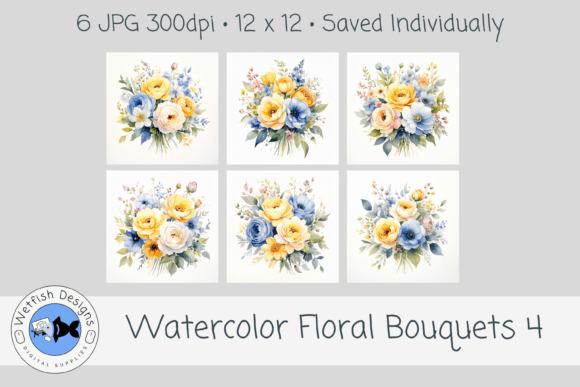
This collection is not just a set of pretty pictures. It is a shortcut to an elevated aesthetic. With six distinct compositions, each bouquet features layered blooms in soft pastel shades, complemented by delicate greenery and natural brush texture. The result is a cohesive set of visuals that whisper rather than shout, making them incredibly versatile for a wide range of projects.
Why This Collection Works for Practical Designers
Let’s break down the specifics because the details matter when you are staring at a deadline. Each image is delivered as a high-resolution JPG, 12x12 inches at 300 DPI.
- The Resolution: 300 DPI means these images are print-ready straight out of the gate. You can use them for large posters or scale them down for a tiny sticker without losing any sharpness.
- The Format: JPG files are universally compatible. You can drag them into Canva, Photoshop, Procreate, Affinity, or even Microsoft Word. There is no learning curve.
- The Cohesion: Because these were painted together, the color palette flows naturally. The pastel pinks, lavenders, and sage greens in one bouquet will perfectly complement the others in the set. This solves the problem of mixing and matching clipart from different sources that clash.
Real People, Real Results: Who Benefits Most?
The beauty of this set lies in its ability to serve vastly different users. Whether you are a hands-on hobbyist or a full-time business owner, you will find a practical use for these blooms.
The DIY Couple Planning a Wedding
Wedding stationery is expensive. Custom watercolor illustrations can be the most expensive line item in a print budget. Watercolor Floral Bouquets 4 offers a pragmatic alternative for couples who want a professional look without the bespoke price tag. You can use a single bouquet as the central motif for your save-the-dates, then repurpose a different bloom for your ceremony programs. Because the files are so high resolution, you can even extract a small cluster of flowers to use as a subtle watermark on your place cards.
Beyond the paper goods, these images work beautifully on signage. A welcome sign for a garden wedding placed on an acrylic easel with these florals behind the text looks like it cost a fortune. For bridesmaids proposals or party favors, a simple tag featuring these watercolors tied around a small candle creates a cohesive, thoughtful gift.
The Small Business Owner Diving into Merch
If you are in print-on-demand or sublimation, you know the struggle of finding artwork that is both beautiful and legally safe to use. Many generic assets are overused or lack the resolution needed for fabric printing. The layered texture of these bouquets translates wonderfully onto tote bags, t-shirts, and ceramic mugs.
Imagine running a small boutique that specializes in eco-friendly home goods. Using one of these bouquets as a repeating pattern on a set of organic cotton tea towels gives you a professional product line without needing to hire a textile designer. The soft, romantic palette appeals directly to customers looking for gentle, handcrafted aesthetics.
The Digital Planner and Journal Creator
The digital planning community thrives on themed kits and beautiful backgrounds. Creators are always searching for elements that add depth without ruining the functionality of a planner. These watercolor bouquets are ideal for cover pages, monthly spreads, and habit tracker backgrounds.
A practical tip for GoodNotes or Notability users: Import the JPG into your app, then select the "Multiply" blend mode (if available) to drop the white background. This allows the flowers to sit seamlessly over your digital paper. It turns a standard weekly layout into a premium, artistic spread that customers are willing to pay more for.
The Blogger and Educator
Free printables are a massive lead generation tool. Whether you are a parenting blogger offering a gratitude journal or a teacher creating classroom posters, the visual design dictates whether someone downloads your freebie or scrolls past. Watercolor Floral Bouquets 4 gives your printables a finished, professional edge.
A wellness coach, for example, can create a seven-day self-care checklist with a subtle floral background. The pastel colors feel calming and supportive, which aligns perfectly with the content. The high resolution ensures that even if someone prints the PDF at home on standard paper, the image remains crisp and beautiful.
Exploring Professional and Commercial Applications
Beyond the standard creative projects, this set has strong applications in specific professional niches that are worth considering.
KDP and Self-Publishing
Amazon’s Kindle Direct Publishing market is highly visual. The book cover has to communicate the genre instantly. If you are publishing a romance novel, a poetry collection, or a guided wellness journal, a cover featuring one of these watercolor bouquets immediately signals the right audience.
Because the files are 12x12 inches, they scale perfectly to standard book sizes like 6x9 or 8.5x11. You can crop the image to focus on a specific cluster of blooms for the cover, then use a wider crop for the back cover or interior chapters. For low-content books like guest books or logbooks, using a different bouquet for every interior spread adds a surprising touch of elegance that justifies a higher retail price.
Branding for Service Providers
If you are a wedding planner, florist, or therapist, your brand needs to convey a specific feeling. Harsh geometric lines might work for a tech startup, but soft, natural textures work for human-centered services. A therapist’s website header featuring these watercolors immediately signals a safe, calm environment. A florist could use these images on their pricing guide or welcome packet to showcase a "watercolor dream" aesthetic that clients associate with high-end floral design.
What to Consider Before You Start Designing
To get the most out of this collection, there are a few practical points worth considering. These are not downsides, but simply workflow adjustments.
- Background Handling: These are JPGs with a solid white background. If you want to place them over a dark or colored surface, you will need to use a "Multiply" blend mode in your software (Photoshop, Canva Pro, Procreate) or use a background removal tool. In Canva, the free background remover works well, but Canva Pro users can do it in one click.
- Print Testing: Watercolor textures look slightly different on screen versus paper. The pastel hues are delicate. If you are printing at home, test a small section first on your specific paper stock (matte photo paper is usually the best match). If you are sending to a professional printer, ask for a hard copy proof to ensure the greens and pinks are reading exactly as you want.
- Licensing Awareness: Always review the specific terms provided by Wetfish Designs. Generally, standard licenses cover small business use, physical products for sale (like cards or mugs), and digital templates. If you plan to distribute the raw digital files as clipart or use them in a massive commercial campaign, you might need an extended license.
- File Organization: The images are saved individually. This is actually a huge time-saver. Name them descriptively in your asset folder (e.g., "Peony_Bouquet_Soft_Pink") so you can quickly locate the right composition for your project.
Practical Integration Tips
Getting the "handcrafted look" into your workflow is easier than you think. Here is how to make it work in common software scenarios.
- In Canva: Upload the JPG. If you want a transparent background, select the image and click "Edit Image" > "Background Remover." For a seamless blend, place the image behind your text and reduce the transparency to 30-40%. This creates a beautiful, soft backdrop.
- In Procreate: Import the image and set the layer blend mode to "Multiply." This instantly drops the white canvas, leaving only the painted blooms. You can then use the "Liquify" tool to gently adjust the shape of the bouquet to fit a specific space, like a circle for a logo.
- In Photoshop: Use the "Color Range" tool under "Select" to quickly mask out the white background. Once masked, you have total freedom to reposition the flowers, add drop shadows for a layered scrapbook look, or apply a gradient map to change the colors to match a specific brand palette.
The Real Value of Watercolor Floral Bouquets 4
At the end of the day, this collection is about saving time while increasing quality. You are buying a shortcut to an aesthetic that usually requires hours of painting and scanning. The cohesive palette eliminates the guesswork of color matching. The high resolution eliminates the fear of pixelation.
Whether you are mapping out your wedding invitations, designing next quarter’s product packaging for your Etsy shop, or simply want to create a beautiful framed print for your living room, Watercolor Floral Bouquets 4 by Wetfish Designs offers a versatile, reliable, and beautiful foundation. It brings a handcrafted soul to your digital workflow, allowing you to focus on the composition and the message, knowing the visuals are already working for you.